22Mar/110
Event 8193 – Volume Shadow Copy Service error
SharePoint Search has its issues sometimes. This one seems to happen to a lot of people, but the solutions that I’ve found weren’t too clear about what to do to solve this. Here’s the event that is triggered.
 Volume Shadow Copy Service error: Unexpected error calling routine RegOpenKeyExW(-2147483646,SYSTEM\CurrentControlSet\Services\VSS\Diag,...).  hr = 0x80070005, Access is denied.
</p><p>Operation:
</p><p>   Initializing Writer
</p><p>Context:
</p><p>   Writer Class Id: {0ff1ce14-0201-0000-0000-000000000000}
</p><p>   Writer Name: OSearch14 VSS Writer
</p><p>   Writer Instance ID: {07c936a8-347c-4e39-8014-2a057f611382}
</p><p>
If you go to the Details tab, you’ll see some additional information about the event.
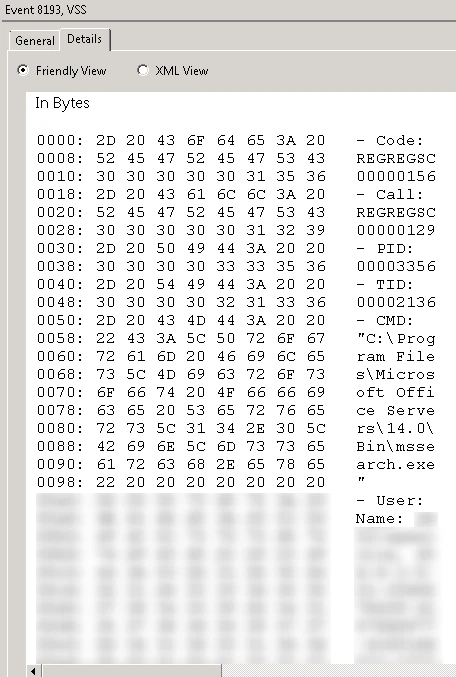
The part after User and Name is the most important here, which I’ve blurred for security reasons. This is the account name that needs full control on the registry key HKLM\SYSTEM\CurrentControlSet\Services\VSS\Diag.
- Start regedit.exe
- Navigate to the key HKLM\SYSTEM\CurrentControlSet\Services\VSS\Diag
- Right-click the key Diag and select Permissions
- Add the account that was indicated in the event and provide it with Full control permission


Enjoy this article?
Consider subscribing to our rss feed!
Comments (0)
Trackbacks (0)
( subscribe to comments on this post )
No trackbacks yet.
Leave a comment